Why We Self-Host Our Stack at ZeroLabs
ZeroLabs runs on a VPS by design. Here is the infrastructure we use, the services we keep close, and why fewer vendors usually makes a small team faster.
Last updated: 2026-03-31 · Tested against Ubuntu 24.04, Docker 29.3.1, and PostgreSQL 16.13
Why does SaaS sprawl hurt small teams?
Self-hosting starts to make sense the moment the glue code becomes the real product. A tiny team can launch quickly with managed services, but the stack often grows sideways before it grows up. Hosting lives in one dashboard, auth in another, the database in a third, mail in a fourth, and now every feature asks you to wire permissions, env vars, webhooks, billing, and logs across all of them.
The price creep is not imaginary. At the time of writing, Vercel Pro starts at $20 per month plus usage, Clerk Pro starts at $25 per month, and Neon’s Launch tier lists a typical spend of $15 per month. None of those numbers are outrageous on their own. Stack three or four together, then add storage, email, monitoring, and seats, and your “simple” app starts feeling like a tray of subscriptions held together with hope and webhook retries.
The bigger problem is not the first invoice. It is operational shape. Every extra vendor becomes another place where state can drift, permissions can be wrong, DNS can get weird, or an integration can fail in a way no single provider can see clearly.
We learned this the usual way, with hands on the keyboard and mild regret. In our experience, once we run more than one product, “best-in-class for every layer” often becomes “best-in-class at making incident response annoying.”
What does the ZeroLabs stack actually look like today?
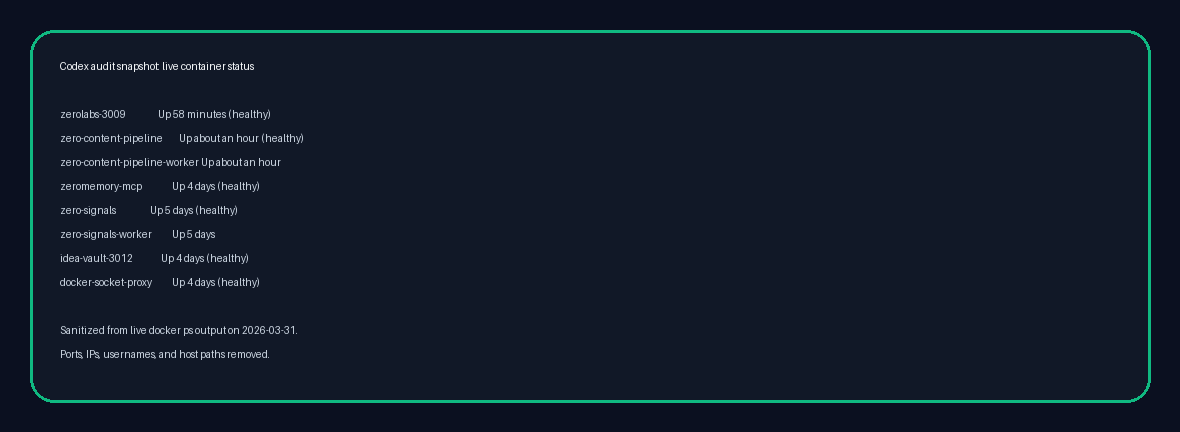
ZeroLabs is not theory for us. It sits inside a live stack we can inspect. Our current VPS manifest shows Ubuntu 24.04 on a 12-core machine with 23 GB of RAM, Docker 29.3.1, PostgreSQL 16.13, Nginx, and 44 running containers supporting public apps and internal systems.
That does not mean one giant mystery box. It means one controlled base layer. In our setup, we run ZeroLabs as a container behind Nginx, and we run ZeroContentPipeline as a separate module. ZeroMemory, Zero-Signals, and OpenClaw-related services live alongside them, but they share the same operational habits: containers, private networking where possible, one PostgreSQL estate we understand, and one place to reason about deployment state.
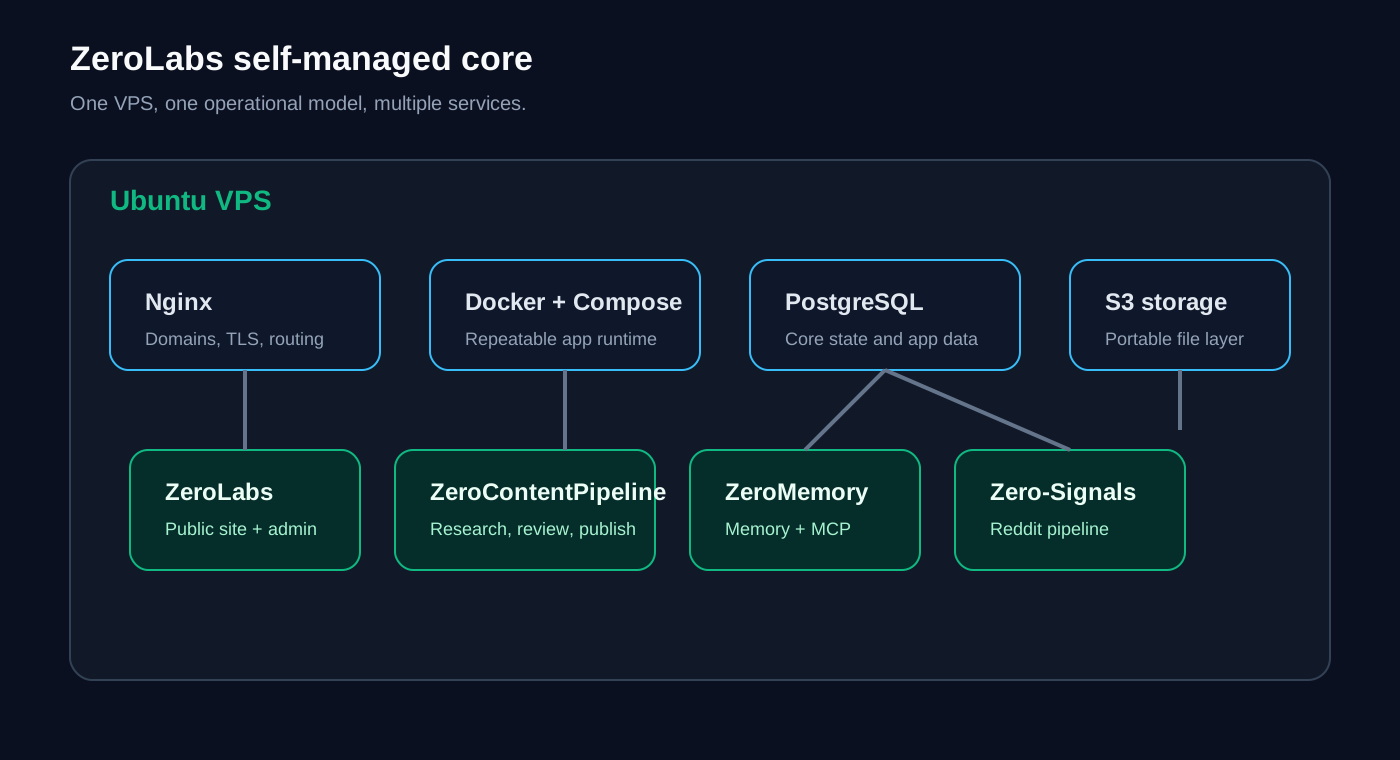
Here is the shape in plain English:
| Layer | What we use | Why it stays close |
|---|---|---|
| Host OS | Ubuntu 24.04 | Boring, stable, well-documented base |
| Runtime | Docker + Compose | Repeatable deploys without hand-built snowflakes |
| Reverse proxy | Nginx | One front door for domains, TLS, and routing |
| Database | PostgreSQL 16.13 | General-purpose relational core we trust |
| Object storage | S3-compatible tooling where useful | One storage model across apps |
| Private access | Tailscale-style private networking and local bindings | Keep internal surfaces off the public internet |
| App layer | ZeroLabs, ZeroContentPipeline, Zero-Signals, ZeroMemory | Separate services, shared operating model |
That is the heart of our VPS & Infra philosophy. One box is not the strategy forever. One understandable control plane is.
For a blog and adjacent internal tools, that trade makes sense. We do not need five separate platform opinions before breakfast. We need a stack we can inspect, back up, and repair without opening a tab cemetery.
Which services do we prefer to self-manage, and why?
We lean self-managed for the parts of the stack that hold core state or define the shape of the app. That usually means hosting, databases, object storage, background workers, private APIs, and sometimes auth. The test is simple: if the thing becomes painful to move later, we would rather own the boring version early.
Hosting
Hosting is the obvious starting point. A VPS plus Docker and Nginx gives us predictable behavior, direct network control, and clean boundaries between services. It also keeps app-to-app traffic local instead of bouncing through three vendors and back again.
Managed hosting can be brilliant for some teams. We still recommend it for people who need to launch this afternoon. But once you already operate multiple services, paying for separate compute wrappers on top of the same Linux basics starts to feel like buying your own tools back one panel at a time.
Database
We strongly prefer keeping the main database close. PostgreSQL is mature, flexible, and boring in the best possible way. It handles transactional data, search extensions, queues, analytics side tables, and half the weird ideas builders come up with at midnight.
Self-managing the database does not mean pretending backups and replication are optional. It means those responsibilities stay visible. We would rather own backup policy, restore drills, extensions, and network exposure explicitly than discover six months later that our data model quietly bent around a platform default we never chose.
Auth
Auth needs nuance. We prefer self-managed auth as a service, not home-grown auth as a hobby. Those are wildly different sentences.
If we self-manage auth, the goal is usually to run a proper identity layer such as Keycloak or a similar product on our infrastructure, not to write password reset flows from scratch while staring into the void. The official Keycloak docs are useful here because they make the production stance very clear: secure by default, with hostname and HTTPS/TLS expected. That is the right attitude.
Why keep auth close at all? Because auth leaks into everything. Session rules, roles, organization boundaries, internal tools, service-to-service trust, and audit trails all get easier when identity lives in the same world as the rest of your app rather than in a separate billing model with its own product roadmap.
Object storage
Object storage is one of our favourite self-managed wins because it is easy to keep the interface standard. MinIO’s S3 API layer is built around AWS S3 compatibility, including the “no code changes required” migration story. That matters.
What is S3-compatible storage? It means your app talks the same bucket-and-object language whether the storage sits in AWS or on your own box. For a small team, that is gold. You can keep the app code simple, avoid vendor-specific file APIs, and move later without sawing the whole storage layer off the product.
Mail is where ideology gets people into trouble. We prefer controlling mail flows and domains, but we are not romantic about deliverability. A mail stack is not just “send email.” It is DNS records, reputation, bounce handling, suppression lists, and a long slow conversation with inbox providers.
So our principle is tighter than “self-host all mail.” We want mail logic to stay close to the app, and we want the delivery path to stay understandable. Sometimes that means a fully self-managed mail layer. Sometimes it means a relay or provider for the last mile, especially when deliverability matters more than purity. Even then, we still want one coherent system, not three overlapping notification vendors and a prayer.
Where does self-hosting save money and complexity?
The cleanest savings show up in three places: base spend, duplicated platform features, and debugging time.
Base spend
The first win is that one VPS can replace several “starter” subscriptions. That does not mean a VPS is always cheaper in every scenario. It means the economics often swing early once you are running more than one service.
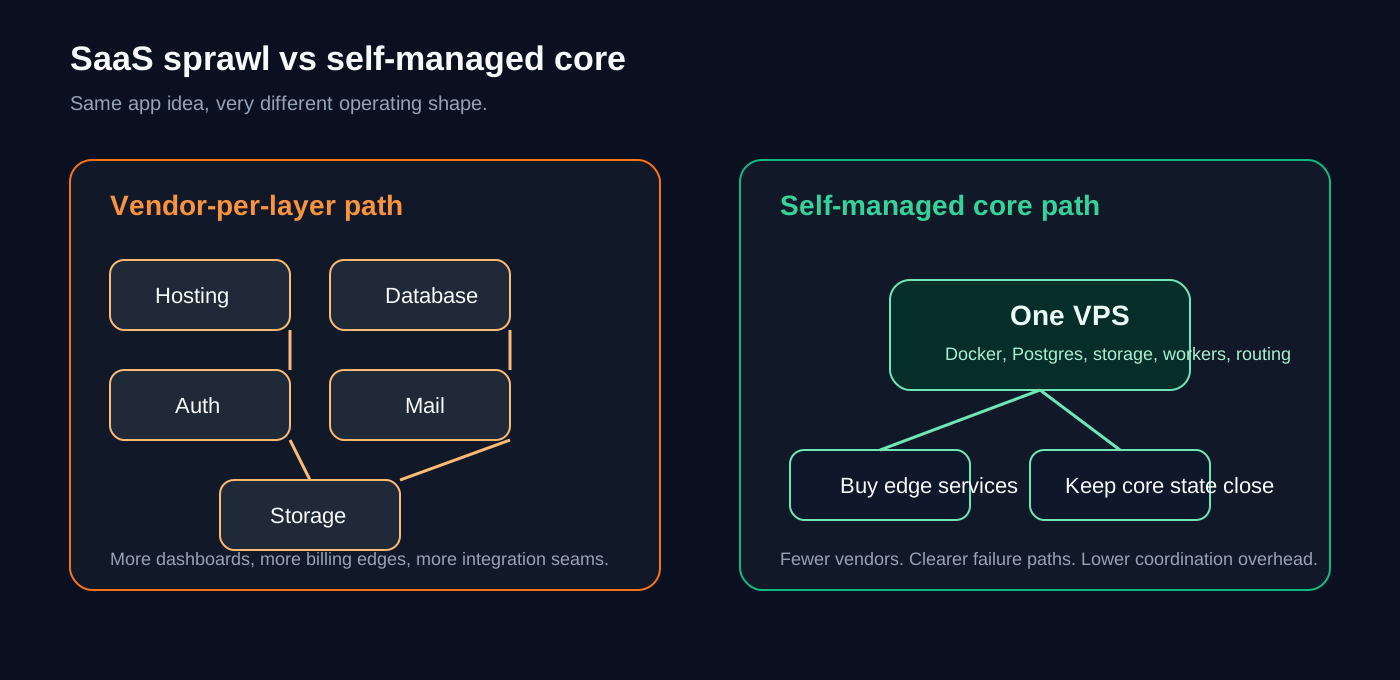
Take a very ordinary modern stack:
| Capability | Common managed choice | Current list-price example | Self-managed direction |
|---|---|---|---|
| Hosting | Vercel | Pro from $20/mo plus usage | VPS compute you already control |
| Database | Neon | Launch typical spend $15/mo | PostgreSQL on the same box or private DB host |
| Auth | Clerk | Pro from $25/mo | Self-managed identity service |
| Resend | Provider plan plus extras like dedicated IPs at $30/mo | Self-managed mail flow or controlled relay |
Again, none of those are bad products. We use products like this all the time when they are the right fit. The point is structural: your stack can start charging rent in four directions before your app has even found its voice.
Duplicated platform features
Managed services often overlap in sneaky ways. You pay for logs in one place, traces in another, auth events in a third, and image or object storage in a fourth. You end up buying “helpful convenience” multiple times.
When we keep the core stack on one VPS, we can centralize a lot of that. Reverse proxy rules live in one place. Network boundaries live in one place. App logs follow one operating model. Backups and health checks can be designed once and reused. That has real value, even if it never appears as a neat line item on an invoice.
Debugging time
This is the bit people forget because it never arrives as a price alert. When a request moves through five vendors, a bug turns into archaeology. You are comparing timestamps, guessing at retries, and trying to work out which dashboard is lying with the most confidence.
In our setup, when something goes sideways we can usually trace the path from Nginx to container to app logs to PostgreSQL without leaving the same operating context. That is a massive quality-of-life improvement. It also makes posts like how to run a security audit on your vibe coded app much more useful, because the remediation path is under our control.
How should you decide what belongs on your VPS, and when should you stop?
Our rule of thumb is boring and useful:
- Keep core state close. Database, object storage, background jobs, internal APIs, and service-to-service communication usually belong near the app.
- Use standard interfaces. PostgreSQL, SMTP, S3-compatible storage, OAuth/OIDC, and HTTP keep future moves realistic.
- Do not build auth or mail from scratch. Run proven services, or buy them, but do not invent them because you felt brave on a Tuesday.
- Centralize observability and ops. One health model, one backup policy, one deployment story, one place to reason about failures.
- Pay for specialty, not convenience theatre. If a vendor gives you something hard to reproduce well, great. If it only gives you another dashboard and a monthly charge, maybe keep that one at home.
There are also clear moments to stop. If you are pre-product, non-technical, under heavy launch pressure, or facing compliance work you are not equipped to handle, managed services are often the better choice. A good rule of thumb is simple: do not self-manage components you cannot support properly. That usually means real restore drills for the database, careful handling for identity, and deliverability work for email.
We like a hybrid stance because it keeps the argument honest. Keep the stateful, movable core close when that helps. Buy the edge where the edge is genuinely specialized.
That same thinking shows up across the rest of our work. The Claude Code hooks piece is really about moving rules closer to execution. The OpenClaw guide is about owning the runtime instead of renting a black box. Different layer, same instinct.
For ZeroLabs, the answer is not “self-host everything forever.” The answer is “self-manage the parts that define the product, and stay ruthlessly honest about what you can support.”
That is the front door to this whole zone. We are interested in infrastructure as a working system, not as a status symbol. If a service helps us ship, keep it. If it mostly adds bills, seams, and platform gravity, we would rather get our hands dirty and run the thing ourselves.
Key terms and tools mentioned
- PostgreSQL: Open-source relational database we use as the core state layer for app data and internal systems.
- Keycloak: Self-managed identity and access platform that shows the kind of mature auth service worth running instead of building from scratch.
- MinIO: S3-compatible object storage layer that keeps file handling portable across self-managed and cloud environments.
This post is the front door for the VPS & Infra zone. From here, we will get more specific: security audits, deployment patterns, internal networking, backup habits, and the small operational choices that keep a self-managed stack from turning feral.
If you are building with AI tools, indie SaaS patterns, or a tiny team, infrastructure does not need to be glamorous. It needs to be understandable. That is the standard we care about.
FAQ
- Is self-hosting always cheaper than managed services?
No. If you only have one tiny app and you value zero ops over everything else, managed platforms can be cheaper in practice because they cost less attention. Running your own stack starts to win once you have multiple services, real state, and enough technical confidence to make one shared platform calmer than four separate vendors.
- Should I self-host auth for my next project?
Only if you are willing to treat identity like core infrastructure. Running a mature auth service can be a smart move, but writing your own login system almost never is. If the real choice is between proven auth SaaS and a weekend of hand-rolled password logic, buy the service and move on.
- What should I self-host first?
Hosting and the database are usually the best first moves because they give you the clearest gain in control. Object storage is a strong third step because S3-compatible tooling keeps migration paths tidy. As a rule of thumb, leave mail and identity until the team has the appetite to support them well.
- What about email deliverability?
Separate mail architecture from inbox reputation. You can keep domains, templates, routing, and event handling under your control while still using a specialist relay for the delivery leg. The mistake is assuming that self-managed automatically means better deliverability. It often means more work instead.
- Is one VPS enough for a real product?
Often, yes, for longer than people expect. A single well-managed server can carry multiple production services if the stack stays boring, workloads stay isolated, backups are real, and resource usage is watched closely. Outgrowing one box is a healthy problem. Outgrowing your ability to understand the system is the worse one.
Ready to keep going? Start with the VPS & Infra zone, then read the app security audit guide and the OpenClaw explainer.