How to Run a Security Audit on Your Vibe-Coded App
Most vibe-coded apps have security gaps hiding in plain sight. This guide walks through a practical 6-area security audit you can run yourself.
AI-generated code is functional but rarely defensive. I ran a full security audit on one of my own production Next.js apps and found leaked server fingerprints, missing rate limits, and API endpoints that revealed whether accounts existed. None of it was catastrophic, but all of it was the kind of stuff an attacker finds before you do.
This post walks through every check I ran across six areas: headers, auth, API boundaries, rate limiting, data exposure, and Content Security Policy. No pentesting certification required. Just curl, a browser, and the 40+ item checklist you can download at the end.
Last updated: 2026-03-27 · Tested against Next.js 15, curl 8.x, and common web frameworks
Why should vibe coders care about security?
When you prompt Claude or ChatGPT to build a login page, it builds a login page. It won't add rate limiting. It won't consider what happens when someone hammers that endpoint 10,000 times. And it certainly won't strip server fingerprints from your response headers.
That's not a criticism of AI tools. They do exactly what you ask. The problem is that security lives in the space between what you asked for and what an attacker will try.
What does a security audit actually look like?
You don't need expensive consultants or enterprise tools. A solid first-pass audit is something you can do yourself. Here's the approach I use:
- Headers audit: Check what your server tells the world about itself
- Auth surface check: Test login, signup, and session handling for leaks
- API boundary review: Verify that protected routes actually protect
- Rate limit verification: Confirm abuse controls are real, not theoretical
- Data exposure scan: See what your public endpoints reveal
- Content Security Policy review: Verify your browser-side defences
Six different angles on the same question: "If someone poked at this with bad intentions, what would they find?"
How do I check my security headers?
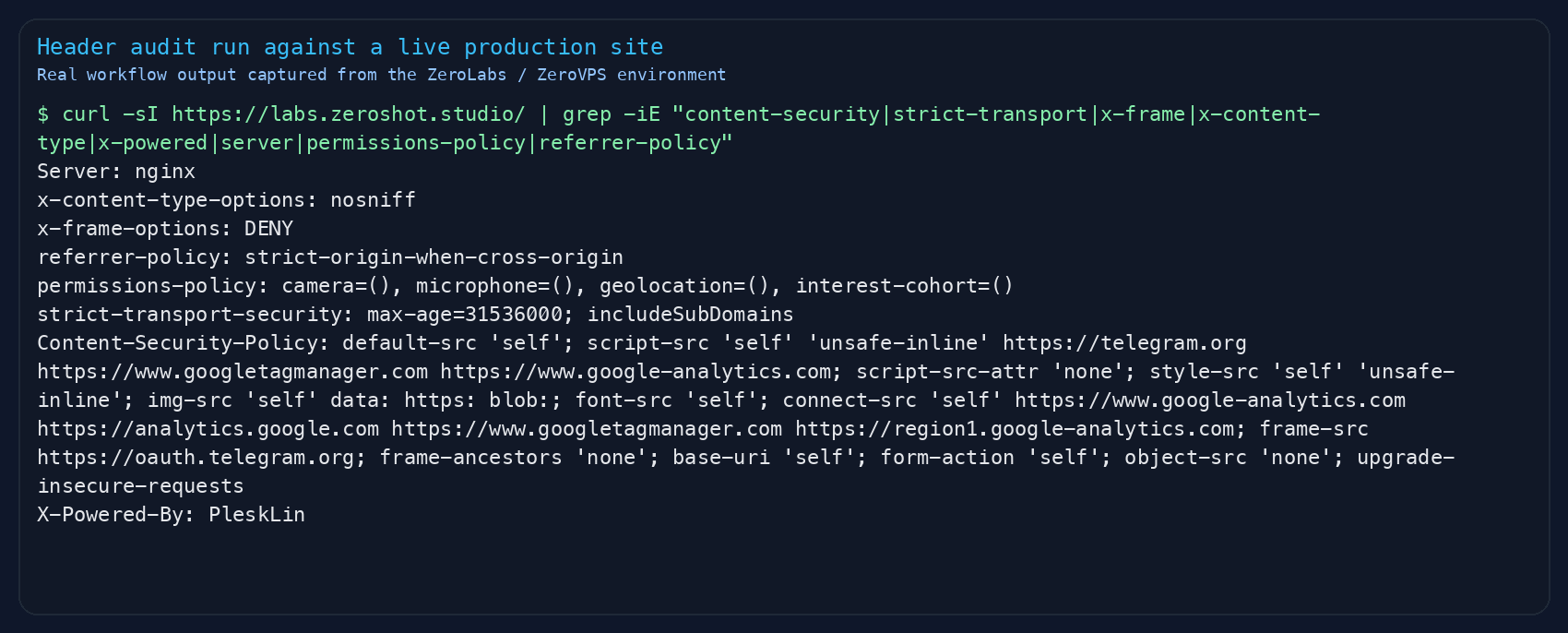
Open your terminal and run this against your production URL:
curl -sI https://your-app.com/ | grep -iE "content-security|strict-transport|x-frame|x-content-type|x-powered|server"You're looking for a few specific things.
Headers you want to see:
| Header | What It Does | Why It Matters |
|---|---|---|
Strict-Transport-Security | Forces HTTPS with long cache | Stops downgrade attacks |
X-Content-Type-Options: nosniff | Stops MIME sniffing | Blocks code injection via file confusion |
X-Frame-Options: DENY | Blocks iframe embedding | Stops clickjacking |
Content-Security-Policy | Controls what scripts/styles can run | Your main XSS defence |
Referrer-Policy | Limits what URL info gets shared | Stops private path leakage |
Permissions-Policy | Restricts browser APIs | Blocks camera/mic/location abuse |
Headers you don't want to see:
X-Powered-By: Next.jsorExpressor anything else. This tells attackers exactly what framework you're running and which CVEs to try.Server: Apache/2.4.51. Same problem. Strip it or genericise it.
In my audit, I found X-Powered-By: PleskLin leaking from the nginx layer, and the framework header coming through the proxy. Two lines of config fixed both.
Is my login flow actually secure?
This is where most vibe-coded apps fall apart. The login works, so it feels secure. But there are three specific things that "working" doesn't cover. I check these on every app I ship, and I still find gaps.
Can someone enumerate accounts through your signup?
Try signing up with an email that already exists, then with a fresh one. If you get different HTTP status codes (say, 409 for existing and 201 for new), an attacker can map out every registered email address on your platform. They don't need to guess passwords. They just need to know who's there.
The fix: Return identical responses for both cases. Same status code, same body, same timing. Something like:
{ "ok": true, "message": "If this email can be used, check your inbox for next steps." }Always 200. Always the same. The server knows the difference, the attacker doesn't.
Can someone brute-force your login?
Try logging in with wrong credentials five times. Then ten times. Then twenty. Did anything change? Did you get rate limited? Did the response slow down?
If the answer is "no, it just kept accepting attempts," you have a problem. A solid auth setup needs at minimum:
- Per-IP rate limiting on auth endpoints (10 attempts per 10 minutes is reasonable)
- Per-account lockout after repeated failures (5 failures locks for 15 minutes). If you're using Claude Code hooks to enforce patterns like this, see how to wire Claude Code hooks for workflow automation
- Progressive delay that gets slower with each failure (prevents rapid automated stuffing)
- Timing-safe responses for unknown users (so attackers can't tell valid from invalid emails by response time)
Do your error messages leak information?
"Invalid password" tells an attacker the email exists. "Account not found" tells them it doesn't. Your login should return the same generic message regardless: "Invalid credentials."
How do I verify my API boundaries?
If your app has authenticated routes, you need to verify two things: that unauthenticated users can't access them, and that authenticated users can only access their own stuff.
The first check is simple:
# Should return 401, not 200curl -s -o /dev/null -w "%{http_code}" https://your-app.com/api/v1/ideascurl -s -o /dev/null -w "%{http_code}" https://your-app.com/api/v1/exportcurl -s -o /dev/null -w "%{http_code}" https://your-app.com/api/v1/accountIf any of those return 200 without a valid session, you've got an open door.
The second check is harder and more important. This is BOLA/IDOR testing (listed as a critical risk in the OWASP Top 10): can User A access User B's data by swapping an ID in the URL?
For every route that takes a resource ID, check:
- Does it verify the authenticated user owns that resource?
- Does it use a compound query (
WHERE id = :id AND userId = :userId) or just fetch by ID? - If it's a public endpoint, does it filter by visibility before returning data?
Are my rate limits actually working?
Having rate limit code in your codebase and having working throttling are different things. Test them:
# Send 65 rapid requests to an endpointfor i in $(seq 1 65); do curl -s -o /dev/null -w "%{http_code} " https://your-app.com/api/v1/tagsdoneYou should see 200s turn into 429s. If all 65 return 200, your rate limiting is either misconfigured or not running in production.
Common gotchas I found:
- In-memory rate limiting resets when your server restarts or scales. Use Redis or an external store. For related cost controls, see saving tokens with Claude Code instructions.
- Fallback gaps: Some rate limiters silently return "allowed" when the backing store is unavailable instead of falling back to an in-memory limiter. That's a wide-open door during an outage.
- Missing global limit: You might have rate limits on specific endpoints but no blanket per-IP limit on all API routes. An attacker targets the unprotected ones.
What is my public API leaking?
Public APIs serve public data. That's fine. But are you serving more than you need to?
Check your public feed or listing endpoints. Look for:
- Internal identifiers: Hashes, internal IDs, or database-level metadata that doesn't serve the user
- Private activity timing: Does an activity heatmap include private or draft content in its counts? That leaks when someone is working on something even if they haven't published it
- Uncapped pagination: Can someone request 10,000 items at once and dump your entire database?
In my audit, I found a public feed returning cryptographic metadata hashes and internal identity hashes in every response. Neither served the user. Both gave an attacker a fingerprinting tool they didn't need.
The fix: Only return what the frontend actually renders. Strip everything else. Cap page sizes (50 items is plenty).
What should my Content Security Policy look like?
CSP is your last line of defence against cross-site scripting. If an injection bug ever makes it into your code, a strong CSP stops the attacker's script from running.
The critical directive is script-src. You want it to say one of these:
script-src 'self' 'nonce-abc123' ← Good: only scripts with this one-time token runscript-src 'self' 'strict-dynamic' ← Good: only explicitly trusted scripts runscript-src 'self' 'unsafe-inline' ← Bad: any injected script runsIf your CSP includes 'unsafe-inline' in script-src, an XSS vulnerability bypasses your entire policy. For a Next.js app, generate a per-request nonce in middleware (the Anthropic docs on prompt security cover similar principles):
- Generate a random nonce in your middleware (Edge Runtime compatible)
- Set the CSP header with that nonce instead of
unsafe-inline - Forward the nonce to your layout via a request header
- Next.js automatically injects the nonce into its script tags
The result: every page load gets a unique, unpredictable token. An injected script without that token gets blocked by the browser.
What about the "obvious" stuff that gets missed?
Some findings from my audit that felt obvious in hindsight but were genuinely hiding in production:
- Dev server logs in user content: A test record created during QA had raw Next.js compilation output pasted as its body. That was rendering on the public page, leaking file paths, route structures, and build info.
- Seed scripts without production guards: Test data scripts that would happily run against the production database. A one-line environment check would have prevented it.
- robots.txt as a sitemap for attackers: A well-meaning robots.txt that disallowed
/api/v1/ideas/,/api/v1/vaults/,/api/v1/api-keys/essentially listed every sensitive endpoint. Disallow directives are for search engines, not security. Attackers read them as a target list. - S3 bucket listing enabled: Object storage configured with
ListBucketpermission when onlyGetObjectwas needed. Anyone could enumerate every file in the bucket.
The Security Audit Checklist
I've put together a 40+ item checklist covering everything in this post. It's broken into six sections matching the audit flow, and each item is something you can check yourself without special tools.
Download it, run through it this weekend, and fix what you find before someone else finds it for you.
FAQ
- I'm using a framework like Next.js that handles a lot of this. Am I already safe?
Frameworks give you a solid foundation, but they don't add rate limiting, strip server fingerprints, tighten CSP beyond defaults, or enforce ownership checks on your API routes. Those are your responsibility. The framework handles the plumbing. Security is the lock on the door.
- How often should I run a security audit?
At minimum, before your first real users and after any significant feature addition. Auth changes, new API endpoints, and new integrations are all triggers. A quarterly check using the checklist takes about an hour and catches drift.
- Do I need to hire a professional pentester?
Not for your first pass. The checklist in this post catches 80% of common web app vulnerabilities. If you're handling payments, medical data, or anything with regulatory requirements, yes, get a professional. But for a side project or early-stage product, start here.
- My AI coding tool says the code is secure. Can I trust that?
No. AI tools generate functional code, not hardened output. They build what you ask for and miss what you don't. Security is the gap between "does it work?" and "what happens when someone tries to break it?"
- What's the single most impactful thing I can do right now?
Run
curl -sI https://your-app.com/and read every header. It takes 30 seconds and often reveals more than you'd expect. If you seeX-Powered-Byorunsafe-inlinein your CSP, those are your first two fixes.
Run It Before Someone Else Does
Your users trust you with their data, their accounts, their content. That trust is worth an afternoon.
The gap between "my app works" and "my app is safe" is smaller than you think: a few hours with the checklist, some config changes, a couple of code fixes. Run the audit this weekend. What you find will either reassure you or save you.
Ready to audit your own app? Grab the checklist and the companion AI agent file from the downloads below. The agent file turns Claude or ChatGPT into a security auditor that walks you through each check step by step.
If this raised questions about hardening production infrastructure, the VPS & Infra zone has more on running secure self-hosted stacks. We publish one practical guide a week.
[Subscribe to the newsletter]
Published on labs.zeroshot.studio by Jimmy Goode. Last updated March 2026.