Open Source UI Agents for Project Boards
Compare open-source project-management UI agents that can move tickets and update boards while keeping a human in the loop instead of guessing status.
What makes a project management UI agent-ready?
Most project management tools are built for humans. Humans click buttons, read dashboards, and intuit their way around messy interfaces. Agents do not.
An agent-ready project management UI needs three things:
1. A predictable API. If your agent has to scrape the DOM or guess which button does what, it will fail. Look for REST APIs, GraphQL endpoints, or well-documented SDKs.
2. Structured data, not pretty visuals. Agents do not care about gradients, animations, or "delightful" micro-interactions. They need JSON, clear status fields, and unambiguous state transitions.
3. Permission scopes that match agent roles. Your agent probably should not have admin rights to delete entire projects. Granular API tokens or OAuth scopes let you give agents exactly the access they need and nothing more.
If a tool fails on any of these, your agent will too.
Plane: The clean starting point
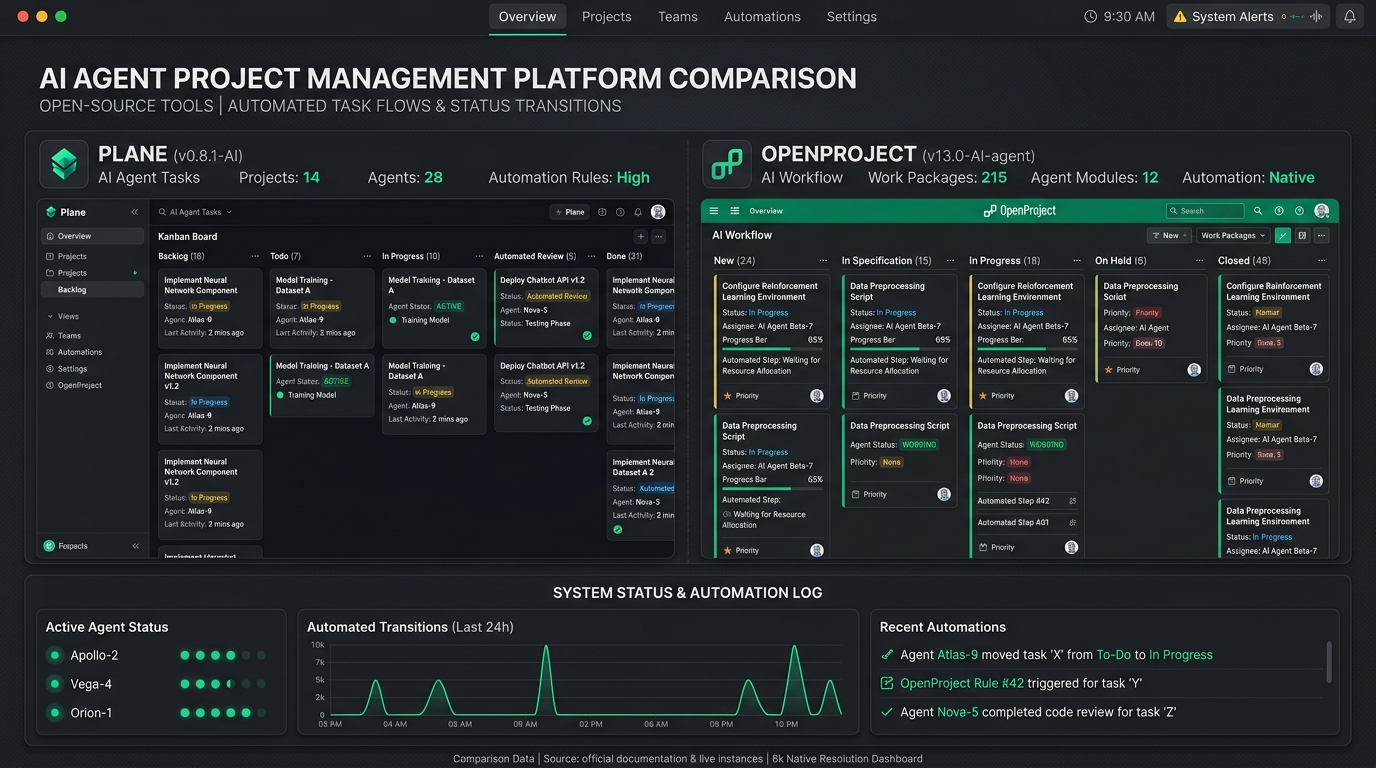
Plane is the friendliest option for agents that need a visual dashboard. It is open source, self-hosted, and built with a modern stack (Django, React, PostgreSQL). The API is straightforward, the data model is clear, and the UI does not get in the way.
What works:
- Clean REST API with predictable endpoints
- Kanban boards, lists, and Gantt charts
- Self-hosted or cloud options
- Active development and community
- API tokens with scoped permissions
What to watch for:
- Still maturing - some edge cases in the API
- Gantt chart support is newer and less stable
- Documentation is good but not exhaustive
Best for: Agents that need to read and update task status, move cards between columns, and give humans a clear view of what is happening.
Agent setup snippet:
curl -X POST https://your-plane-instance/api/v1/workspaces/{workspace_id}/projects/{project_id}/issues/ \ -H "Authorization: Bearer YOUR_API_TOKEN" \ -H "Content-Type: application/json" \ -d '{"name": "Agent task", "description": "Created by agent", "status": "backlog"}'OpenProject: The sturdy enterprise option
OpenProject has been around longer. It is built for serious project management with Gantt charts, time tracking, cost reporting, and role-based permissions. If your agent needs to work inside a larger organization's workflow, this is the choice.
What works:
- Mature, stable API
- Excellent Gantt chart and timeline support
- Fine-grained role and permission system
- Self-hosted or enterprise cloud
- Strong support for Agile, Scrum, and Kanban
What to watch for:
- Heavier setup and resource requirements
- UI is functional but not modern
- API is comprehensive but not always intuitive
Best for: Agents operating in regulated environments, large teams, or workflows that need Gantt charts and detailed permissions.
Agent setup snippet:
# List work packages via OpenProject APIcurl -X GET https://your-openproject-instance/api/v3/projects/{project_id}/work_packages \ -H "Authorization: Bearer YOUR_API_TOKEN"Vikunja: The lightweight task specialist
Vikunja is the newest of the three and the most focused on tasks. No Gantt charts, no time tracking, no bloat. Just tasks, lists, namespaces, and a very clean API.
What works:
- Extremely lightweight and fast
- Very clean REST API
- Simple data model - easy for agents to reason about
- Self-hosted, low resource usage
- Good for task-focused agents that do not need project overhead
What to watch for:
- No Gantt or timeline views
- Smaller community and ecosystem
- Less suitable for complex project structures
Best for: Agents that only need to manage task lists, check off items, and report status. Minimal overhead.
Agent setup snippet:
# Create a task in Vikunjacurl -X PUT https://your-vikunja-instance/api/v1/namespaces/{namespace_id}/lists/{list_id}/tasks \ -H "Authorization: Bearer YOUR_API_TOKEN" \ -H "Content-Type: application/json" \ -d '{"title": "Agent task", "description": "Created by agent", "done": false}'Head-to-head comparison
| Feature | Plane | OpenProject | Vikunja |
|---|---|---|---|
| API quality | Clean REST | Comprehensive REST | Clean REST |
| Kanban boards | Yes | Yes | No (task lists only) |
| Gantt charts | Yes (newer) | Yes (mature) | No |
| Time tracking | No | Yes | No |
| Resource requirements | Medium | High | Low |
| Setup complexity | Moderate | High | Low |
| Best agent fit | Visual dashboards | Enterprise workflows | Task lists only |
| Self-hosted | Yes | Yes | Yes |
| Mobile app | Yes | Yes | Yes |
| Community size | Growing | Large | Small |
Decision shortcut:
- Need a visual dashboard humans will also use? → Plane
- Need Gantt charts, permissions, enterprise features? → OpenProject
- Need pure task management with minimal overhead? → Vikunja
How to set up your agent with Plane
Since Plane is the most agent-friendly starting point, here is a step-by-step setup for giving your agent access.
Step 1. Deploy Plane
git clone https://github.com/makeplane/plane.gitcd planedocker-compose up -dWait for the containers to start. Access the instance at http://localhost:8080.
Step 2. Create an API token
- Log in as admin
- Go to Settings → API Tokens
- Create a new token with scopes:
read:issues,write:issues,read:projects,write:projects
Step 3. Test the connection
curl -X GET https://your-plane-instance/api/v1/workspaces/ \ -H "Authorization: Bearer YOUR_API_TOKEN"Step 4. Define agent permissions
Create a dedicated "Agent" user in Plane with limited project access. Give it only the projects and issue statuses it needs. Never give an agent admin rights unless you want it deleting things at 3am.
Step 5. Write the agent integration
Use the Plane REST API endpoints or the unified AgentTaskBridge adapter to automate issue lifecycles:
import requestsclass PlaneAgentBridge: def __init__(self, base_url: str, api_token: str, workspace_slug: str): self.base_url = base_url.rstrip("/") self.headers = {"Authorization": f"Bearer {api_token}", "Content-Type": "application/json"} self.workspace_slug = workspace_slug def create_task(self, project_id: str, title: str, description: str, status: str = "backlog"): url = f"{self.base_url}/api/v1/workspaces/{self.workspace_slug}/projects/{project_id}/issues/" payload = {"name": title, "description": description, "status": status} res = requests.post(url, json=payload, headers=self.headers, timeout=10) res.raise_for_status() return res.json()FAQ
Which tool is easiest for a beginner agent builder?
Plane. The API is the most intuitive, the setup is moderate, and you get visual feedback when something goes wrong.
Can I switch tools later?
Yes, but you will need to migrate data and rewrite your agent's API calls. Pick the right one from the start to avoid this.
Do I have to self-host?
All three offer self-hosted options. Plane and OpenProject also have cloud versions. Vikunja is self-hosted only.
What if my agent needs to create Gantt charts?
OpenProject or Plane. Vikunja cannot do this.
How do I keep humans in the loop?
Give humans access to the same project instance. They see what the agent sees. Use status fields like "agent-done, needs-human-review" to signal when human input is needed.
What to do next
Pick one tool and deploy it today. Do not overthink. The best project management UI for your agent is the one you actually set up and test.
If you want a visual dashboard that humans can also use, start with Plane. If you need enterprise features and Gantt charts, go with OpenProject. If you want something lightweight and fast, Vikunja is ready.
Once it is running, connect your agent and watch how it behaves. The first week will tell you more than any comparison table.
Need help setting up your agent with any of these tools? Drop a message. We figure this out together.
📦 Open-Source Companion Recipe & Starter Kit
Get the complete agent bridge harness, multi-platform task adapter, and companion skill file directly from the official ZeroLabs repository:
👉 zerolabs-recipes/ai-workflows/best-open-source-project-management-ui-agents
Includes:
AgentTaskBridgePython SDK: Unified interface across Plane, OpenProject, and Vikunja REST APIs with offline simulation mode.- Agent Skill Manifest (
SKILL.md): Ready-to-use tool and instruction definitions for Claude Code, Cursor, and OpenClaw agents to manage Kanban states autonomously. - Docker Compose Stacks & Test Suite: Automated verification test harness for local execution without live cloud credentials.