Claude Code Hooks Replace Half of CLAUDE.md
Claude Code hooks enforce repo rules at runtime so you can shrink CLAUDE.md. Put invariant checks in hooks and leave the file for intent the model needs.
Last updated: 2026-03-27 · Tested against Claude Code v0.2.29
Why do CLAUDE.md rules break?
Your CLAUDE.md gets injected into Claude's context window. Claude reads it, considers it, and usually follows it. The operative word is "usually."
Write "never use rm -rf" in CLAUDE.md and Claude will respect that instruction most of the time. But occasionally it's deep in a multi-step task, context is compressed, and your rule gets deprioritised against the immediate goal. That's not a bug. That's how language models work: they're probability engines, not rule executors.
In our ZeroShot Studio workflows, we used to hit this wall repeatedly. CLAUDE.md said "always run tests before committing." Claude followed it for the first three tasks, then skipped it on the fourth because it was "a minor change." The tests would have caught a broken import.
Anthropic's hooks documentation puts it plainly: hooks "provide deterministic control over Claude Code's behavior, ensuring certain actions always happen rather than relying on the LLM to choose to run them."
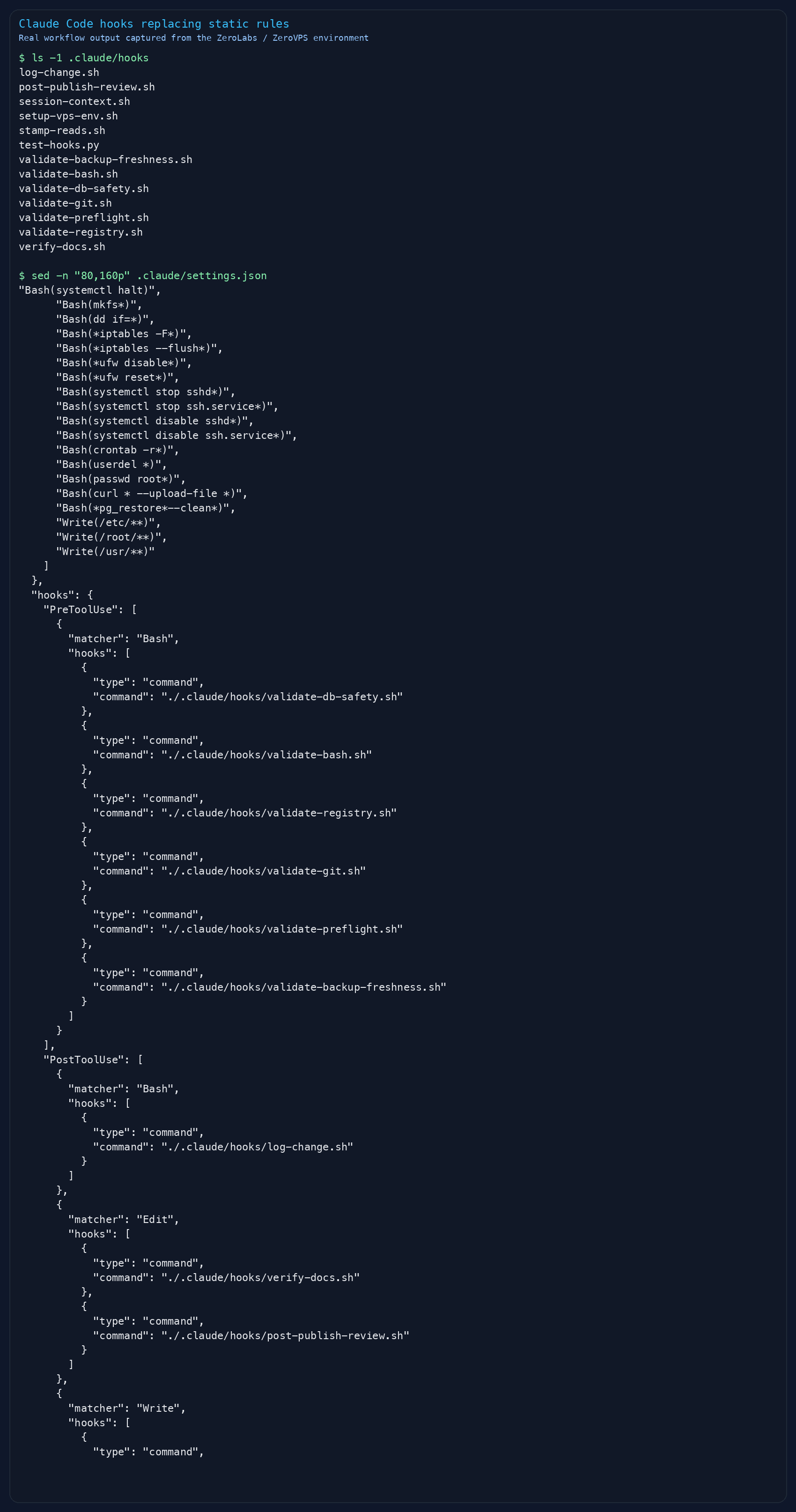
What are Claude Code hooks?
Hooks are shell commands that execute at fixed points in the session. Not Claude the model. The harness ie the runtime wrapper.
That distinction matters. CLAUDE.md lives inside the LLM's context. Hooks live outside it. The harness runs your hook script, reads the exit code, and enforces the result before Claude ever sees what happened.
What's a hook? A shell script that fires on an event, reads JSON from stdin, and returns a decision: proceed, block, or modify.
Here's the minimal anatomy:
- Event fires. Claude is about to run a Bash command (PreToolUse event).
- Harness pipes JSON to your script. Tool name, input arguments, session ID.
- Your script decides. Exit 0 to allow, exit 2 to block.
- Harness enforces. Claude never gets to override the decision.
{ "hooks": { "PreToolUse": [ { "matcher": "Bash", "hooks": [ { "type": "command", "command": ".claude/hooks/validate-bash.sh" } ] } ] }}That goes in .claude/settings.json. Every Bash command Claude tries to run now passes through your script first.
How do hooks compare to CLAUDE.md rules?
| Aspect | CLAUDE.md | Hooks |
|---|---|---|
| Execution | LLM reads and considers | Harness runs deterministically |
| Can block actions | No, Claude decides | Yes, exit code 2 blocks |
| Survives context compression | Best-effort | Always fires |
| Can modify tool input | No | Yes, via updatedInput |
| Can run external scripts | No | Yes, any shell command |
| Can call APIs | No | Yes, HTTP hook type |
| Scope | Guidelines and context | Enforcement and validation |
The comparison isn't "hooks are better." It's "hooks and CLAUDE.md solve different problems." CLAUDE.md tells Claude what you prefer. Hooks enforce what you require.
Which rules should be set up as hooks?
Not everything belongs in a hook. Here's the split we use:
Keep these in CLAUDE.md:
- Coding conventions (naming, patterns, architecture preferences)
- Project context (what the app does, who it's for)
- Communication style ("be concise," "don't add docstrings I didn't ask for")
- Workflow preferences ("prefer editing over creating new files")
Move these to hooks:
- Security blocks (prevent destructive commands, protect sensitive files)
- Formatting enforcement (auto-run prettier after edits)
- Validation gates (lint checks, test runs before commits)
- Environment injection (load project-specific variables)
- Audit logging (track every tool call to a log file)
- Permission automation (auto-approve safe operations)
The rule I use: if failure means "Claude did something slightly different than I wanted," it's a CLAUDE.md rule. If failure means "data got deleted" or "secrets got committed," it's a hook.
If you want the full implementation walkthrough, how to set up Claude Code hooks for your workflow covers the step-by-step from scratch.
How do you write your first hook?
Start with the most common case: blocking dangerous Bash commands.
- Create the script. Save this as
.claude/hooks/protect-prod.sh:
#!/bin/bashINPUT=$(cat)COMMAND=$(echo "$INPUT" | jq -r '.tool_input.command // empty')if echo "$COMMAND" | grep -qiE "drop table|drop database|truncate|rm -rf /"; then echo "Blocked: Destructive command detected. Use a migration instead." >&2 exit 2fiexit 0-
Make it executable.
chmod +x .claude/hooks/protect-prod.sh -
Register it in settings.json:
{ "hooks": { "PreToolUse": [ { "matcher": "Bash", "hooks": [ { "type": "command", "command": ".claude/hooks/protect-prod.sh" } ] } ] }}- Test it. Ask Claude to run
DROP TABLE usersand watch it get blocked. Every time.
Exit code 2 blocks execution and sends your stderr message back as feedback. Exit code 0 lets it through.
What hook events are available?
According to Anthropic's hooks reference, there are 25 lifecycle points. These are the ones you'll actually use:
| Event | When | Can block? | Use for |
|---|---|---|---|
| PreToolUse | Before any tool runs | Yes | Block commands, validate inputs |
| PostToolUse | After a tool succeeds | No | Auto-format, audit logging |
| SessionStart | Session begins | No | Inject environment, load context |
| Stop | Claude finishes responding | Yes | Verify work is complete |
| UserPromptSubmit | User sends a message | Yes | Prompt validation |
| FileChanged | Watched file modified | No | React to config changes |
| PermissionRequest | Permission dialog appears | Yes | Auto-approve safe operations |
Matchers use regex. "Bash" matches only Bash. "Edit|Write" matches both. "mcp__.*" matches all MCP tools. Case-sensitive, so "bash" won't match "Bash".
What patterns actually replace CLAUDE.md rules?
These are running in production right now.
Pattern 1: Auto-format on save. Instead of "please run prettier after editing files" in CLAUDE.md:
{ "PostToolUse": [ { "matcher": "Edit|Write", "hooks": [ { "type": "command", "command": "jq -r '.tool_input.file_path' | xargs npx prettier --write 2>/dev/null; exit 0" } ] } ]}Pattern 2: Protected files. Instead of "don't edit .env or package-lock.json" in CLAUDE.md:
#!/bin/bashFILE=$(cat | jq -r '.tool_input.file_path // empty')case "$FILE" in *.env|*package-lock.json|*CODEOWNERS) echo "Blocked: $FILE is protected." >&2 exit 2 ;;esacexit 0Pattern 3: Context injection after compaction. CLAUDE.md content can get compressed away. This survives:
{ "SessionStart": [ { "matcher": "compact", "hooks": [ { "type": "command", "command": "echo '{\"hookSpecificOutput\":{\"hookEventName\":\"SessionStart\",\"additionalContext\":\"Current sprint: auth-refactor. Use bun, not npm.\"}}'" } ] } ]}Pattern 4: Audit trail. Log every file edit without relying on Claude to remember:
#!/bin/bashINPUT=$(cat)FILE=$(echo "$INPUT" | jq -r '.tool_input.file_path // empty')TOOL=$(echo "$INPUT" | jq -r '.tool_name')echo "$(date -u +%Y-%m-%dT%H:%M:%SZ) $TOOL $FILE" >> .claude/audit.logexit 0Pattern 5: Stop gate. Verify tests pass before Claude considers itself done:
{ "Stop": [ { "hooks": [ { "type": "agent", "prompt": "Run the test suite and verify all tests pass before stopping.", "model": "claude-haiku", "timeout": 120 } ] } ]}Common errors and gotchas (troubleshooting)
A few things bit us early on. Ask me how I know...
Shell profile pollution. If your .zshrc has unconditional echo statements, they pollute stdout and JSON parsing breaks silently. Wrap any echo in if [[ $- == *i* ]]; then.
Exit code 2 is the only block. Exit 1 doesn't block, it just logs to verbose output. Only exit 2 actually stops the action.
PostToolUse can't undo. The tool already ran. The file is already edited, the command already executed. For blocking, use PreToolUse.
Stop hook loops. If your Stop hook tells Claude to keep going, check stop_hook_active in the input JSON. When it's true, you're in a re-check. Exit immediately or you'll loop forever. We learned this one the hard way at 2am.
Matcher case sensitivity. "bash" does not match "Bash". Use exact tool names: Bash, Edit, Write, Read, Glob, Grep.
FAQ
- Can hooks and CLAUDE.md work together?
They should. CLAUDE.md gives Claude the reasoning to make good decisions. Hooks catch the cases where good decisions aren't enough. We keep conventions and project context in CLAUDE.md. Security, formatting, and validation live in hooks.
- Do hooks work with MCP tools?
Yes. MCP tools follow the naming pattern
mcp____. Match them with regex:"mcp__github__.*"catches all GitHub MCP calls."mcp__.*"catches everything.
- Where do hooks go for team projects?
.claude/settings.jsonin the project root gets committed to the repo and shared with the team. Personal hooks go in~/.claude/settings.json(machine-wide) or.claude/settings.local.json(project-specific, gitignored).
- Can a hook modify Claude's input?
Yes. PreToolUse hooks can return
updatedInputin their JSON output. The harness swaps Claude's original input with your modified version before execution.
The split that actually works
Stop trying to make CLAUDE.md your enforcement. It's a context document, not a contract.
Move your "must always happen" rules into hooks. Keep your "here's how we work" guidelines in CLAUDE.md. The result is a system where Claude has good judgement from context and hard guardrails from code.
We cut our CLAUDE.md from 400 lines to 100 after migrating enforcement into hooks. Claude followed the remaining guidelines more reliably because there was less noise. Hooks handled the non-negotiables without burning context tokens.
That's the real win. Not just reliability, but focus. CLAUDE.md gets to be what it should be: a concise project brief, not a massive token-burning rule book that the model gradually forgets.
Go build your first hook. The official hooks documentation has the complete event reference and JSON schemas.