Sipeed MaixCAM RISC-V Handheld with NPU
A hands-on review of Sipeed MaixCAM. Sub-$30 Sophgo SG2002 RISC-V compute, 1 TOPS NPU, 2.3-inch touchscreen, and rapid Python edge vision deployments.
What is Sipeed MaixCAM & why did it catch our eye?
Sipeed MaixCAM is an ultra-affordable, all-in-one AI vision development kit that brings 1 TOPS of neural processing, a 5MP camera, and a color touchscreen together for under $30. It boots Linux in 3 seconds flat and runs full Python 3.
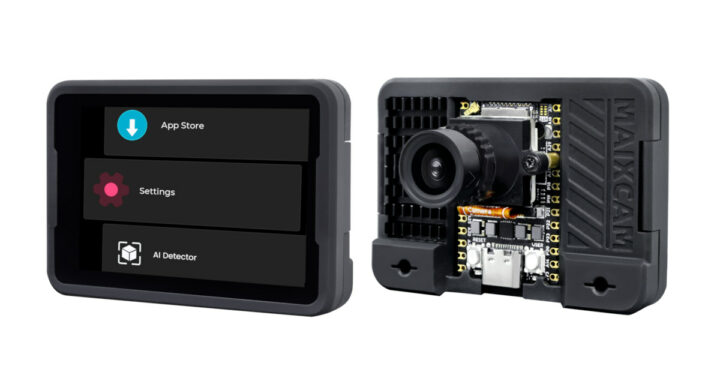
Most single-board computers that claim to offer edge AI cost between $80 and $150 once you add the camera module, display shield, and power supply. Sipeed turned that economics model upside down. By choosing the Sophgo SG2002 silicon, they squeezed an entire vision computing pipeline into a handheld form factor that costs less than a couple of restaurant lunches.
When testing the board with the official Sipeed MaixPy runtime, the development velocity is immediately obvious. You do not need to cross-compile heavy C++ binaries or wrestle with GStreamer pipelines. You SSH in over Wi-Fi 6, launch a Python REPL, and pass camera frames directly to the NPU.
Hardware specs at a glance
Here is how the silicon and I/O stack up under the hood:
| Subsystem | Specification | Practical Builder Notes |
|---|---|---|
| SoC / Compute Engine | Sophgo SG2002 | Heterogeneous multi-core architecture |
| Primary CPU Core | 64-bit RISC-V C906 @ 1 GHz | Can alternatively be software-booted as ARM Cortex-A53 |
| AI / NPU Performance | 1 TOPS @ INT8 | Hardware acceleration for YOLOv8, MobileNet, and ResNet |
| System Memory | 256MB DDR3 (SIP) | Stacked in package with SoC for low latency |
| Touch Display | 2.3-inch capacitive touchscreen | 552 x 368 resolution for live UI feedback |
| Camera Sensor | 5MP GC4653 CMOS Sensor | Wide field-of-view MIPI CSI camera module |
| Wireless Networking | Wi-Fi 6 (2.4 GHz) + BLE 5.4 | High-bandwidth local frame streaming |
| Price & Form Factor | Under $30 | Available via Sipeed Wiki |
The DIY factor: Can you actually hack and mod it?
Sipeed designed the MaixCAM specifically for the maker and physical prototyping community:
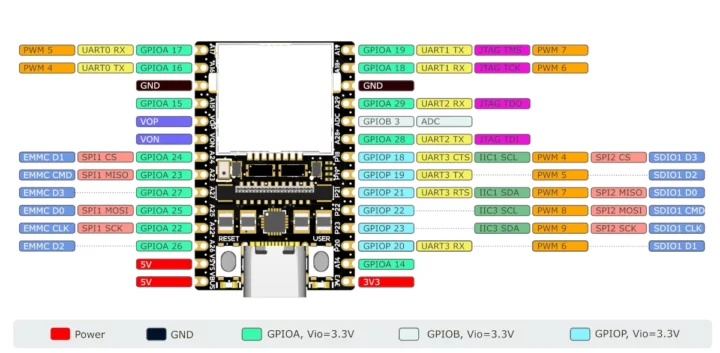
- Dual-row breadboard headers: Unlike smartphone boards with micro-pitch connectors, the MaixCAM breaks out dual rows of standard 2.54 mm pitch headers. You can drop it directly onto a breadboard or solder standard DuPont jumpers to interface with motors, relays, and I2C sensors.
- Dual-architecture flexibility: The Sophgo SG2002 silicon is unique: it contains both RISC-V and ARM cores. By flipping a firmware setting, you can boot the board as a 64-bit RISC-V Linux system or an ARM Cortex-A53 Linux system depending on your preferred compiler ecosystem.
- Open-source ecosystem: The board is supported by the open-source MaixCDK and MaixPy v4. There are no binary blobs required to run inference on the NPU.
flowchart TD
    subgraph Edge ["Edge Acceleration"]
        direction LR
        Cam["5MP GC4653 Camera"] -->|MIPI CSI| NPU["Sophgo SG2002 NPU"]
    end
    subgraph Interface ["Runtime & Endpoints"]
        direction LR
        Runtime["MaixPy Runtime"] --> HUD["Touchscreen HUD"]
        Runtime -->|Wi-Fi 6 REST| Agent["OpenClaw Agent"]
    end
    Edge -->|Tensor Output| Interface
How does it hook into coding agents and vibe coding?
Because the device runs full Python 3 with interactive shell access, coding agents can write, deploy, and verify scripts on the device interactively over SSH.
Here is how simple it is to run a live YOLOv8 detector and stream detections to a local agent:
# Minimal YOLOv8 detection loop in MaixPy v4from maix import camera, display, nn# Initialize sensor and on-board displaycam = camera.Camera(512, 320)disp = display.Display()# Load quantized YOLOv8 model directly onto NPUdetector = nn.YOLOv8(model="/root/models/yolov8n.mud")while True: img = cam.read() results = detector.detect(img, conf_th=0.5, iou_th=0.45) for obj in results: img.draw_rect(obj.x, obj.y, obj.w, obj.h, color=(0, 255, 0), thickness=2) print(f"[detection] Class: {obj.class_id}, Score: {obj.score:.2f}") disp.show(img)What is the catch before you order one?
At under $30, some compromises were necessary:
- 256MB RAM ceiling: The unified DDR3 memory is shared between the Linux kernel, display framebuffer, and neural model. It excels at lightweight models like YOLOv8-nano, but you cannot run large multimodal models or heavyweight desktop applications.
- Single-band Wi-Fi: The wireless transceiver supports Wi-Fi 6 protocols, but operates only in the 2.4 GHz spectrum, not 5 GHz.
- Documentation language: While the main Sipeed Wiki is available in English, some community forum discussions and cutting-edge sample code comments are originally written in Chinese.
What we are building with it next
We are incorporating the MaixCAM into our ongoing lab experiments:
- 3D printer print failure detector: Mounting the MaixCAM directly to our printer gantry to identify filament spaghetti and immediately trip an OctoPrint relay.
- Interactive tabletop agent avatar: Using the 2.3-inch touchscreen to render animated robotic expressions while running wake-word detection.
- Multi-board cluster comparison: Testing vision latency side-by-side with ESP-Mosaico and neural MCUs.
Explore more autonomous edge experiments in the ZeroLabs Resources hub.
FAQ
How much does Sipeed MaixCAM cost? The base dev kit retails for approximately $25 to $29 through official maker outlets and Sipeed's online store.
Does MaixCAM run MicroPython or real Python? It runs real Python 3.11 on top of an embedded Linux kernel, with C-accelerated bindings for the camera, display, and NPU.
Can I power it from a portable battery? Yes. The board powers easily from any standard 5V USB-C power bank, typically drawing between 300 mA and 600 mA during full vision inference.