Raspberry Pi AI Camera: Sony IMX500 On-Sensor Neural Compute
A maker breakdown of the Raspberry Pi AI Camera. Sony IMX500 stacked sensor with on-chip tensor compute, RP2040 coprocessor, and zero-overhead edge vision.
What is the Raspberry Pi AI Camera & why did it catch our eye?
The Raspberry Pi AI Camera is a 12.3-megapixel camera module designed in partnership with Sony Semiconductor. It executes neural network inference directly on the camera sensor silicon before pixels are transmitted over the CSI ribbon cable.
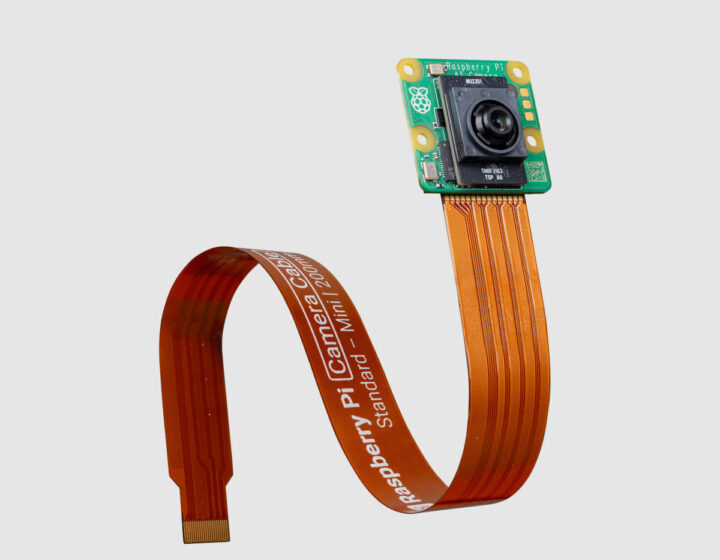
In conventional edge AI architectures, a camera sensor captures raw optical data and streams megabytes of pixel data across an interface bus to a host processor. The host CPU or GPU then works overtime running tensor convolutions, consuming massive power and generating significant heat.
The Raspberry Pi AI Camera flips this paradigm. By using Sony's IMX500 stacked CMOS technology, a neural network accelerator sits on the physical logic die laminated directly beneath the photodiode array. The sensor processes the incoming image instantaneously, outputting pre-computed bounding boxes, class labels, and pose coordinates directly into the CSI-2 data stream alongside the video feed.
Hardware specs at a glance
Here is how the silicon and I/O stack up under the hood:
| Subsystem | Specification | Practical Builder Notes |
|---|---|---|
| Sensor Silicon | Sony IMX500 Intelligent Vision Sensor | 12.3 Megapixel stacked CMOS image sensor |
| On-Die Accelerator | Sony Neural Network Accelerator | Hardware INT8 tensor engine embedded on sensor logic layer |
| Firmware Coprocessor | Raspberry Pi RP2040 MCU | Dual-core Arm Cortex-M0+ handling model staging and flash |
| Optics & Lens | Adjustable manual focus (M12 equivalent) | 76-degree Field of View, pre-assembled with CS-mount style ring |
| Resolution & Video | 4056 x 3040 @ 10 fps (2028 x 1520 @ 30 fps) | High-resolution still captures and 1080p full-rate inference |
| Host Interface | Standard Raspberry Pi 15-pin / 22-pin CSI | Compatible with Raspberry Pi Zero, Pi 4, and Pi 5 |
| Software Support | libcamera + Picamera2 native | Official upstream support in Raspberry Pi OS Bookworm |
| Retail Price | $70 MSRP | Available through official Raspberry Pi approved resellers |
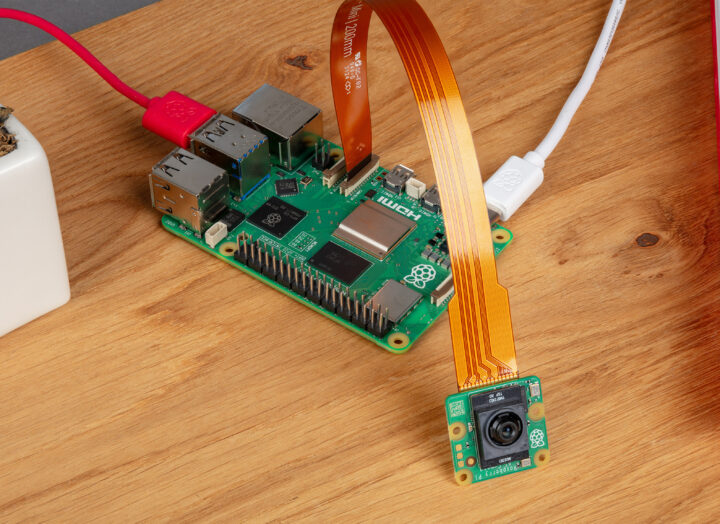
The DIY factor: Can you actually hack and mod it?
For Raspberry Pi makers, camera integration has often meant dealing with proprietary closed blobs. The AI Camera is refreshingly open:
- Native libcamera integration: The camera operates seamlessly inside standard libcamera and picamera2. You do not need to install out-of-tree kernel drivers or third-party daemon processes.
- RP2040 firmware bridge: Raspberry Pi embedded their own RP2040 dual-core microcontroller on the rear of the camera PCB. The RP2040 handles loading neural network weights into the sensor's internal SRAM during boot, ensuring clean firmware upgrades without risking bricked silicon.
- Broad compatibility: Because the host processing load is virtually zero, this camera runs just as fast on a $15 Raspberry Pi Zero 2 W as it does on a top-spec Raspberry Pi 5.
flowchart TD
    subgraph Sensor ["Sony IMX500 Silicon"]
        direction LR
        Optics["12.3MP Sensor"] -->|On-Die TSV| NPU["Neural Accelerator"]
    end
    subgraph Host ["Raspberry Pi Host"]
        direction LR
        Pi["Host Linux / libcamera"] --> Driver["Picamera2 Pipeline"] -->|Event Stream| Agent["OpenClaw Supervisor"]
    end
    Sensor -->|CSI-2 Metadata| Host
How does it hook into coding agents and vibe coding?
Because the camera is supported directly in Picamera2, coding agents can interface with it using clean, idiomatic Python.
Here is how you capture real-time neural bounding boxes without taxing your host processor:
# Real-time object detection with Raspberry Pi AI Camerafrom picamera2 import Picamera2import time# Initialize Picamera2 with AI model overlaypicam2 = Picamera2()config = picam2.create_preview_configuration(main={"size": (1920, 1080)})picam2.configure(config)# Start camera and load IMX500 post-processing tensor stagepicam2.start()print("[camera] AI Camera running on-sensor inference...")try: while True: # Capture metadata frame containing on-sensor tensor results metadata = picam2.capture_metadata() detections = metadata.get("SensorDetections", []) for det in detections: print(f"[detection] Detected {det['category']} with confidence {det['confidence']:.2f}") time.sleep(0.1)except KeyboardInterrupt: picam2.stop()What is the catch before you order one?
Here are the practical constraints to keep in mind:
- Model format and quantization: Neural models must be compiled using Sony's IMX500 model converter. While popular models like MobileNet SSD, YOLOv8-pose, and person detection are pre-compiled and ready in Raspberry Pi OS, custom architectures require navigating Sony's developer tools.
- SRAM storage constraints: The on-sensor accelerator has limited internal SRAM for model weights. You cannot upload arbitrary multi-gigabyte models to the camera die; models must be rigorously quantized.
- Form factor: At 25 x 24 mm with the integrated RP2040 backplate and lens assembly, it is slightly thicker than the standard Raspberry Pi Camera Module 3.
What we are building with it next
We are connecting the Raspberry Pi AI Camera to our physical workshop infrastructure:
- Autonomous security sentry: Pairing the AI Camera with a Raspberry Pi Zero 2 W running on battery power for remote perimeter monitoring with negligible power consumption.
- Vision-to-text MCP bridge: Piping on-sensor detection coordinates directly into OpenClaw tool calls to give our software agents spatial awareness.
- Cross-silicon benchmark: Comparing accuracy, latency, and power draw against the CamThink NeoEyes NE302 and ESP-Mosaico.
Find more edge silicon and agent architecture breakdowns in our ZeroLabs Hardware Zone.
FAQ
Which Raspberry Pi models support the AI Camera? All Raspberry Pi computers with a standard CSI camera connector are supported, including Raspberry Pi 4, Raspberry Pi 5, Raspberry Pi Zero 2 W, and Compute Modules.
Can I train my own models for the AI Camera? Yes. You can train models in PyTorch or TensorFlow, export them to ONNX, and convert them using Sony's IMX500 converter tools.
Does the AI Camera replace a Raspberry Pi AI Kit? They serve different purposes. The AI Kit (Hailo-8L M.2 HAT) provides 13 TOPS of general-purpose compute on a Pi 5. The AI Camera provides 100% on-sensor inference compatible with all Pi models, including the Pi Zero.