Self-Host Headless Agents on an Ubuntu VPS
Hardened guide to self-hosting autonomous AI agents on Ubuntu 24.04 VPS with Xvfb virtual displays, headless Chromium pools, and systemd sandboxing.
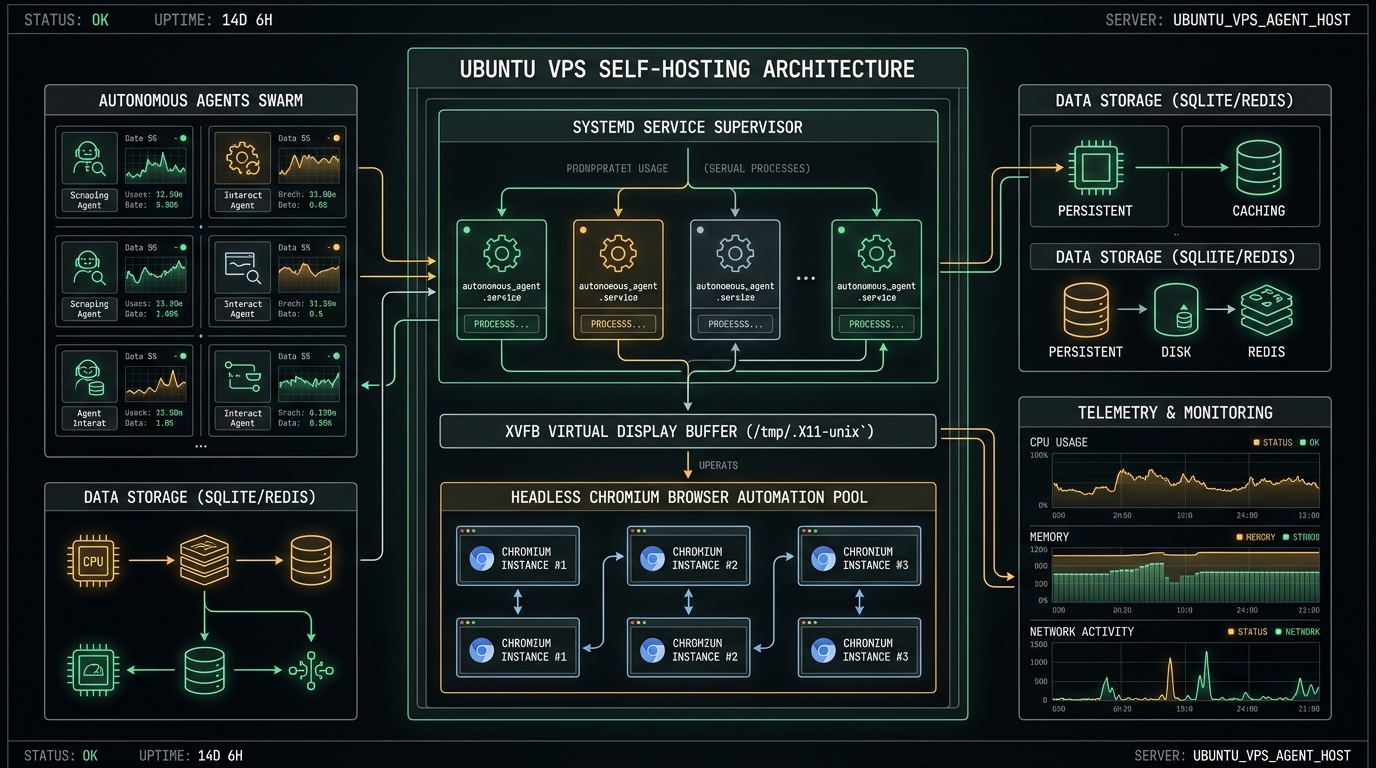
Contents
- Why self-host autonomous agents on a dedicated Ubuntu VPS?
- Configuring Xvfb virtual display and headless Chromium
- Supervising agent daemon processes with systemd
- Preventing memory leaks and zombie browser processes
- Production cluster architecture and internal integrations
- FAQ
Why self-host autonomous agents on a dedicated Ubuntu VPS?
Running autonomous agents on local development laptops causes frequent interruptions when your workstation sleeps, changes Wi-Fi networks, or exhausts local RAM.
Deploying agents to a dedicated Ubuntu VPS (such as a 4-core, 8GB RAM Hetzner or DigitalOcean instance) provides three critical production advantages:
- Continuous Execution: Scheduled tasks, cron collectors, and webhook listeners run 24/7 without laptop sleep interruptions.
- Fixed Static IP: Reliable access for webhook validation, external API whitelisting, and secure SSH tunnels.
- Environment Isolation: Shell executions operate inside a sandboxed Linux perimeter rather than touching personal file systems.
flowchart TD
    A[System Cron / Webhook Trigger] --> B[systemd Supervisor Service]
    B --> C[Agent Core Runtime]
    C --> D[Xvfb Virtual Display :99]
    D --> E[Headless Chromium CDP Pool]
    C --> F[(Local SQLite / Postgres Store)]
When provisioning the host, pair your deployment with our OpenClaw Ubuntu Server Setup for daemon configurations and host firewall rules.
Configuring Xvfb virtual display and headless Chromium
Many web scraping, browser automation, and computer-use tools fail on headless Linux servers because no graphical display is available. Xvfb (X Virtual Framebuffer) emulates an X11 display server entirely in system RAM.
Install the required packages on Ubuntu 24.04 LTS:
sudo apt-get update && sudo apt-get install -y \ xvfb \ chromium-browser \ libnss3 \ libxss1 \ libasound2t64 \ fonts-liberationInitialize the virtual framebuffer on display :99 and verify headless rendering:
# Launch Xvfb on display :99 with 1920x1080 resolutionXvfb :99 -screen 0 1920x1080x24 -ac &export DISPLAY=:99# Verify headless browser executionchromium-browser --no-sandbox --disable-dev-shm-usage --dump-dom https://example.comSupervising agent daemon processes with systemd
To ensure your autonomous agent automatically recovers from unexpected crashes, memory spikes, or server reboots, configure a hardened systemd service with security sandboxing:
# /etc/systemd/system/agent-worker.service[Unit]Description=Autonomous Agent Supervisor ServiceAfter=network.target[Service]Type=simpleUser=agentWorkingDirectory=/opt/autonomous-agentEnvironment=DISPLAY=:99Environment=NODE_ENV=productionExecStart=/usr/bin/python3 /opt/autonomous-agent/scripts/run_worker.py --scheduledRestart=on-failureRestartSec=10# Security and SandboxingProtectSystem=strictPrivateTmp=trueProtectHome=read-onlyReadWritePaths=/opt/autonomous-agent /var/logStandardOutput=append:/var/log/agent-worker.logStandardError=append:/var/log/agent-worker.log[Install]WantedBy=multi-user.targetEnable and activate the service:
sudo systemctl daemon-reloadsudo systemctl enable agent-worker.servicesudo systemctl start agent-worker.serviceFor agent pipelines performing multi-step operations, incorporate Deterministic Circuit Breakers to fail closed on tool timeouts instead of letting processes hang indefinitely.
Preventing memory leaks and zombie browser processes
Browser automation tasks frequently leave orphaned Chrome subprocesses that gradually exhaust host RAM.
Implement a cron cleanup script to sweep stale browser processes:
#!/usr/bin/env python3# scripts/cleanup_stale_browsers.pyimport psutilimport timedef sweep_orphaned_browsers(): current_time = time.time() for proc in psutil.process_iter(["pid", "name", "create_time"]): try: name = proc.info["name"].lower() if "chrome" in name or "chromium" in name: # Terminate headless browser sessions exceeding 15 minutes if current_time - proc.info["create_time"] > 900: print(f"Sweeping stale browser PID: {proc.info["pid"]}") proc.terminate() except (psutil.NoSuchProcess, psutil.AccessDenied): passif __name__ == "__main__": sweep_orphaned_browsers()Schedule the cleanup check every 15 minutes in crontab:
*/15 * * * * /usr/bin/python3 /opt/autonomous-agent/scripts/cleanup_stale_browsers.py >> /var/log/chrome-cleanup.log 2>&1Production cluster architecture and internal integrations
Self-hosting autonomous agents on Ubuntu is most resilient when coupled with local state management. Rather than sending intermediate context across external third-party vectors, store telemetry and memory snapshots locally using our guide on Persistent Memory Architectures.
For team-wide agent coordination, ensure your repository standardizes rule definitions with the blueprint outlined in Designing Production-Grade OpenClaw Skills.
FAQ
- What are the hardware requirements for self-hosting autonomous agents on Ubuntu?
A baseline instance requires 2 vCPUs and 4GB RAM for lightweight tool calling. For workflows running concurrent headless browser pools and CDP automation, provision at least 4 vCPUs and 8GB RAM with 4GB swap enabled.
- Why is the --no-sandbox flag needed for Chromium on a Linux VPS?
When running Chromium under restricted non-root service accounts on Ubuntu server images, Linux unprivileged user namespaces may be restricted by AppArmor. Using
--no-sandboxinside a dedicated VPS boundary allows execution while maintaining system-level container isolation.
- How do I inspect what the headless browser is rendering for debugging?
You can attach
x11vncto the virtual framebuffer on display:99(x11vnc -display :99 -nopw -listen localhost -xkb) and tunnel the VNC port over SSH (ssh -L 5900:localhost:5900 user@vps) to inspect live agent interactions in real time.