Secrets, API Keys, and Rate Limits on Day One
Ship the first AI project without leaking keys. Store secrets outside the repo, rotate them, and set rate limits before a retry loop burns the quota.
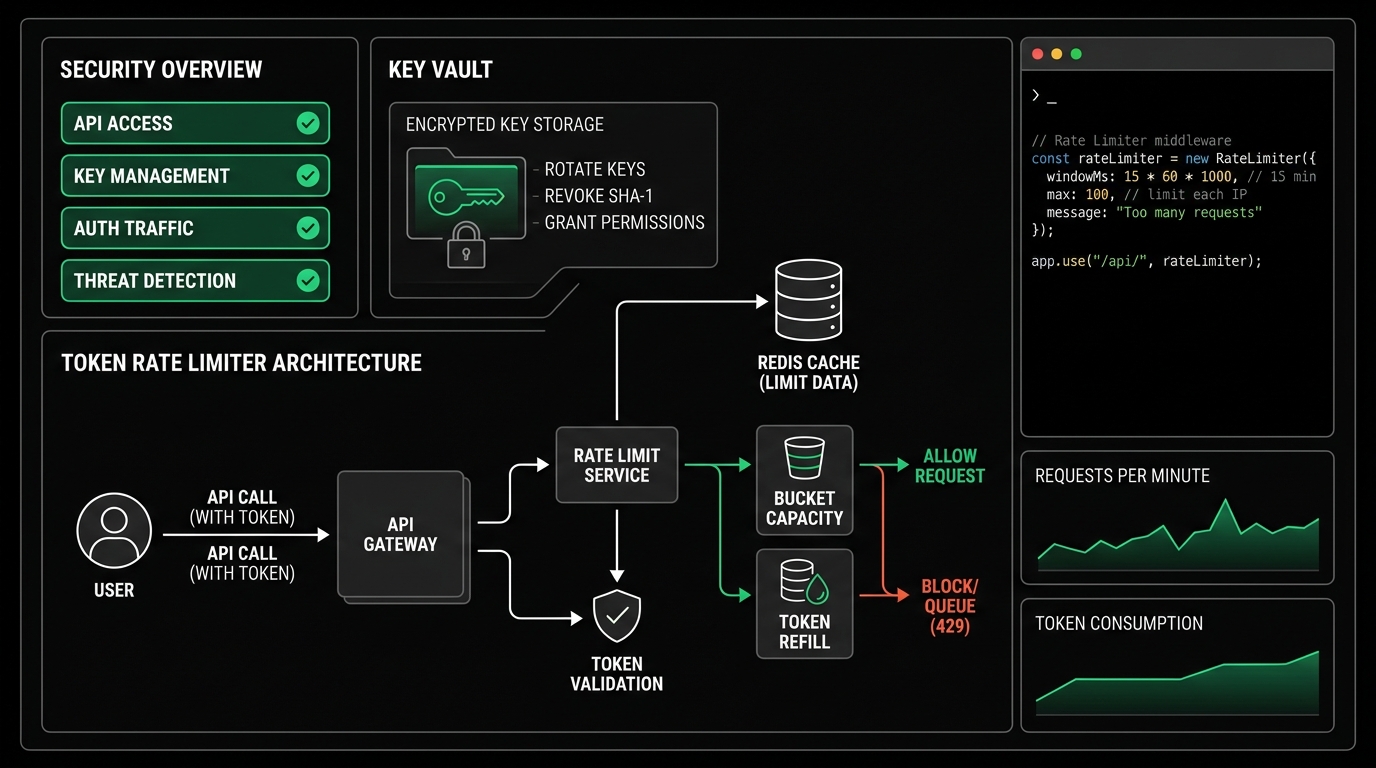
Contents
- The vibe coding speed trap: How credentials leak and bills explode
- The Twelve-Factor secret isolation blueprint
- Client vs server architecture: Keep keys off the browser
- Spend caps, key scoping, and emergency kill switches
- Demystifying rate limits: RPM vs TPM vs burst windows
- Defensive concurrency: Exponential backoff with full jitter
- Implementation: A production API safety harness in Python
- FAQ
The vibe coding speed trap: How credentials leak and bills explode
When you build software using AI coding assistants like Cursor, Claude Code, or Copilot, progress feels frictionless. You prompt for a full-stack feature, accept generated files, and run the project locally. In our earlier guide on getting started safely, we covered workspace trust and baseline environment hygiene. But when it comes to API credentials and external service limits, the default code generated by AI models is frequently insecure.
AI assistants are trained to write functional demonstrations, not hardened production infrastructure. As a result, generated code defaults to anti-patterns:
- Hardcoded credentials in source code: The model inserts
api_key = "sk-proj-..."directly inside a client file or test script. - Client-side exposure: In single-page React, Vue, or Next.js applications, assistants often import the model client directly into the frontend bundle (
process.env.NEXT_PUBLIC_OPENAI_KEY), exposing your private key to anyone who opens browser DevTools. - Missing
.gitignoreentries: New repositories are committed to GitHub without excluding.env,.env.local, or configuration cache files. - Unbounded concurrency loops: Scripts fire hundreds of asynchronous requests simultaneously without concurrency throttling, hitting upstream HTTP 429 rate limit walls and triggering cascading thundering-herd retries.
According to research from GitHub Secret Scanning, malicious bots scan public commits across GitHub within 60 seconds of publication. Leaked OpenAI or Anthropic keys are immediately captured and used to run expensive batch inference or crypto-scraping tasks until your credit card maximum is reached.
Shipping safely requires treating secrets and upstream API limits as first-class architectural constraints.
flowchart TD
    subgraph Insecure["Default Workflow (Insecure)"]
        direction TB
        Browser["Web / Client App"] -->|"Exposes Key"| CloudLLM1["Provider API (Uncapped)"]
        Git["Git Commit"] -->|"Leaks .env"| ScraperBots["Scraper Bots ($$$)"]
    end

    Insecure ~~~ Secure

    subgraph Secure["ZeroLabs Hardened Architecture"]
        direction TB
        Client["Client App"] -->|"Session Token"| Proxy["Server API Proxy"]
        Proxy -->|"Concurrency Pool"| Limiter["Token Bucket Rate Limiter"]
        Limiter -->|"Scoped Key"| CloudLLM2["Provider API"]
    end
The Twelve-Factor secret isolation blueprint
The foundation of secure credential management is the Twelve-Factor App methodology: strict separation of config from code. Config that varies between deployments (production, staging, development) must be stored in the environment, never checked into version control.
1. The three-file environment structure
Every vibe-coded repository should maintain a clean three-tier environment structure:
.env.example(Committed): A template showing all required variable keys with dummy placeholder values and descriptive comments. Never put real tokens here..env(Local only, Gitignored): Your active working credentials. This file must never touch git history..env.test(Local or CI): Mock credentials or sandbox endpoints for unit and integration testing.
Here is a clean .env.example template:
# Model Provider CredentialsOPENAI_API_KEY=your_openai_api_key_hereANTHROPIC_API_KEY=your_anthropic_api_key_here# Runtime Safety BoundsMAX_SPEND_LIMIT_USD=25.00MAX_CONCURRENT_REQUESTS=5REQUEST_TIMEOUT_SECONDS=302. Bulletproof .gitignore rules
Do not rely on a single .env line in .gitignore. AI coding tools often create variations like .env.local, .env.production, or backup files like .env.bak. Add this block to your .gitignore immediately upon scaffolding:
# Environment variables and credentials.env.env.*!.env.example*.pem*.key*.cert*.pfxsecrets/credentials.jsontoken.jsonAs detailed in our primer on GitHub for beginners, if you accidentally stage a secret file, run git reset HEAD before creating a commit. Once a secret is committed locally, amending or rolling back history requires specialized tools like git-filter-repo to erase it cleanly.
3. Type-safe validation with Pydantic Settings
Reading raw strings with os.environ.get() scattered across multiple files leads to runtime crashes when an environment variable is missing or misspelled.
At ZeroShot Studio, we consolidate all application configuration into a single Pydantic Settings class. This enforces fail-fast validation at application startup: if an essential API key is absent, the service exits immediately with an actionable error message rather than failing in the middle of a user request.
from pydantic import Field, SecretStrfrom pydantic_settings import BaseSettings, SettingsConfigDictclass AppConfig(BaseSettings): model_config = SettingsConfigDict( env_file=".env", env_file_encoding="utf-8", extra="ignore" ) openai_api_key: SecretStr = Field(..., description="OpenAI API secret key") max_concurrent_requests: int = Field(default=5, ge=1, le=20) request_timeout_seconds: float = Field(default=30.0, gt=0) max_spend_limit_usd: float = Field(default=50.0, gt=0)# Instant validation on initializationconfig = AppConfig()Using SecretStr guarantees that calling print(config) or dumping the object to a log file masks the value as **********, preventing accidental leaks into observability dashboards.
Client vs server architecture: Keep keys off the browser
One of the most frequent security failures in early vibe coding projects is attempting to call LLM APIs directly from frontends:
// DANGEROUS: Do not do this in client-side codeimport OpenAI from 'openai';const openai = new OpenAI({ apiKey: process.env.NEXT_PUBLIC_OPENAI_API_KEY, // LEAKED TO THE WORLD dangerouslyAllowBrowser: true});When an environment variable is prefixed with NEXT_PUBLIC_ or bundled into a Vite, Create React App, or Astro frontend, its plain-text string is compiled directly into static JavaScript files. Any visitor can open the browser Inspector, go to the Network or Sources tab, and copy your key.
The rule is absolute: Paid API keys must never exist in client-side code.
sequenceDiagram
    autonumber
    participant Client as Client App (Browser / Mobile)
    participant Server as Your Backend API Route
    participant LLM as Frontier AI Provider

    Client->>Server: POST /api/generate (Auth Session Token)
    Note over Server: 1. Validate session & rate limit per user<br />2. Verify spend budget ceiling<br />3. Inject private SecretStr key
    Server->>LLM: POST /v1/chat/completions (Bearer SecretKey)
    LLM-->>Server: HTTP 200 (Model Response & Token Usage)
    Note over Server: Record token count & cost internally
    Server-->>Client: Filtered Response Payload (Clean JSON)
Instead, route all model requests through an internal backend endpoint (such as Next.js API route, FastAPI endpoint, or Express handler). Your backend:
- Authenticates the end user.
- Enforces per-user rate limits.
- Attaches the private API key on the server side.
- Validates the returned schema before sending sanitized data back to the client.
Spend caps, key scoping, and emergency kill switches
Relying solely on model providers to protect your bank account is a mistake. Providers earn revenue when tokens are consumed, so proactive spend defense is your responsibility.
1. Set hard spend limits at the provider level
Before making your first API call, configure two distinct thresholds in your provider dashboard (OpenAI, Anthropic, or OpenRouter):
- Notification threshold: Generates an email alert when you reach 50% of your expected monthly budget.
- Hard spend cap: An absolute ceiling that causes the provider to return HTTP 400 errors for all subsequent requests once exceeded.
If you are building an experimental prototype, set your hard cap to $10.00 or $25.00. You can increase the limit later once your application is stable and usage patterns are understood.
2. Use fine-grained, project-scoped API keys
Never generate an organization-wide admin API key for a side project. Modern AI platforms support project-scoped keys with restricted permissions:
- Restrict the key to read/write inference models only.
- Disable administrative permissions, billing management, and fine-tuning endpoints.
- Assign the key to a distinct project workspace with its own dedicated monthly budget limit.
If a project-scoped key is ever compromised, revoking it impacts only that single application without disrupting the rest of your infrastructure.
3. Implement an application-level emergency kill switch
In autonomous agent systems, as explored in our guide on simple AI workflows before agents, an unhandled error can trigger an automated loop. Implement a local kill switch using an environment flag or cached value:
import osimport sysdef check_kill_switch(): if os.environ.get("AI_CIRCUIT_BREAKER_ACTIVE", "false").lower() == "true": print("[CIRCUIT BREAKER] AI execution globally paused via kill switch.", file=sys.stderr) raise SystemExit("Emergency kill switch activated.")If you notice unexpected traffic or abnormal billing while inspecting your observability logs, setting this single flag immediately halts all outgoing calls without requiring a code deploy.
Demystifying rate limits: RPM vs TPM vs burst windows
When your application starts receiving real traffic, provider API calls will eventually fail with HTTP 429 Too Many Requests. Understanding how providers calculate rate limits prevents random crashes.
Model platforms measure throughput across three simultaneous axes:
| Limit Type | Unit | Description | What Causes Breaches |
|---|---|---|---|
| RPM | Requests Per Minute | Total number of HTTP requests submitted in a rolling 60-second window | High-concurrency worker pools, unthrottled loops |
| TPM | Tokens Per Minute | Total tokens (prompt tokens + generated tokens) processed per minute | Sending massive context windows, document processing |
| RPD / TPD | Requests / Tokens Per Day | 24-hour rolling volume caps tied to billing tier | Sustained background ingestion, bulk evals |
flowchart TD
    Traffic["Surge Traffic"]

    subgraph Window["Rolling Window (1 Min)"]
        RPM["RPM Limit: 500 req"]
        TPM["TPM Limit: 100k tok"]
    end

    Traffic --> RPM
    Traffic --> TPM

    RPM -->|"Exceeded"| Err429A["HTTP 429 (Requests)"]
    TPM -->|"Exceeded"| Err429B["HTTP 429 (Tokens)"]
Key nuance: TPM limits include your input prompt tokens. If you send 5 concurrent requests containing 20,000 tokens of documentation each, you have consumed 100,000 tokens in a single second. Even if your RPM limit is 5,000 requests per minute, your very next call will be rejected with an HTTP 429 error because your TPM allocation is exhausted.
Always inspect response headers returned by the provider:
x-ratelimit-remaining-requestsx-ratelimit-remaining-tokensx-ratelimit-reset-requestsretry-after
Reading these headers allows your application to know exactly how many seconds it must pause before retrying.
Defensive concurrency: Exponential backoff with full jitter
When an API returns HTTP 429, the standard beginner response is to retry immediately inside a try/except block or use a fixed sleep: time.sleep(2).
This creates the thundering herd problem. If 20 concurrent tasks fail simultaneously and all sleep for exactly 2 seconds, all 20 tasks will retry at the exact same millisecond, guaranteeing another HTTP 429 rejection.
The mathematically proven solution is exponential backoff with full jitter:
- Exponential base: Each subsequent retry attempt doubles the base wait duration ($2^0, 2^1, 2^2, ...$).
- Full jitter: Instead of waiting the exact calculated duration $T$, wait a randomly distributed duration between $0$ and $T$: $$t_{wait} = \text{uniform}(0, \min(T_{max}, T_{base} \times 2^{attempt}))$$
Randomizing the delay spreads out retries across the timeline, allowing the upstream rate limit bucket to recover smoothly.
sequenceDiagram
    autonumber
    participant App as Application Worker
    participant Provider as LLM Provider API

    App->>Provider: Call 1 (Heavy prompt burst)
    Provider-->>App: HTTP 429 Too Many Requests (Rate limit hit)
    Note over App: Calculate jittered backoff: uniform(0, 1.0 * 2^0) = 0.62s
    App->>Provider: Call 1 Retry 1 (after 0.62s delay)
    Provider-->>App: HTTP 429 Too Many Requests
    Note over App: Calculate jittered backoff: uniform(0, 1.0 * 2^1) = 1.48s
    App->>Provider: Call 1 Retry 2 (after 1.48s delay)
    Provider-->>App: HTTP 200 OK (Processed successfully)
Pairing exponential backoff with an asyncio.Semaphore guarantees that your local process never bombards the provider with more concurrent connections than your tier allows.
Implementation: A production API safety harness in Python
Here is a standalone, dependency-free Python safety harness that implements type-safe environment secrets, concurrency control, exponential backoff with full jitter, and spend tracking.
You can drop this module directly into your project as api_safety.py:
"""ZeroLabs API Safety HarnessEnforces secret masking, concurrency bounds, and jittered exponential backoff."""import asyncioimport osimport randomimport timefrom dataclasses import dataclassfrom typing import Any, Callable, Coroutine, Optional@dataclass(frozen=True)class SafeConfig: api_key: str max_concurrency: int = 5 max_retries: int = 4 base_backoff_seconds: float = 1.0 max_backoff_seconds: float = 16.0 total_spend_cap_usd: float = 20.0 @classmethod def from_env(cls) -> "SafeConfig": raw_key = os.environ.get("OPENAI_API_KEY", "").strip() if not raw_key: raise ValueError("CRITICAL: OPENAI_API_KEY is not set in environment variables.") if raw_key.startswith("sk-") and len(raw_key) str: if len(self.api_key) <= 8: return "********" return f"{self.api_key[:4]}...{self.api_key[-4:]}"class ResilientClient: def __init__(self, config: Optional[SafeConfig] = None): self.config = config or SafeConfig.from_env() self.semaphore = asyncio.Semaphore(self.config.max_concurrency) self.cumulative_cost_usd = 0.0 def record_cost(self, cost_usd: float) -> None: self.cumulative_cost_usd += cost_usd if self.cumulative_cost_usd >= self.config.total_spend_cap_usd: raise RuntimeError( f"BUDGET EXCEEDED: Cumulative cost ${self.cumulative_cost_usd:.4f} " f"exceeds hard spend cap of ${self.config.total_spend_cap_usd:.2f}." ) async def execute_with_retry( self, api_callable: Callable[..., Coroutine[Any, Any, Any]], *args: Any, **kwargs: Any ) -> Any: async with self.semaphore: for attempt in range(self.config.max_retries + 1): try: # Check emergency kill switch if os.environ.get("AI_KILL_SWITCH", "false").lower() == "true": raise SystemExit("Emergency kill switch active. Execution aborted.") return await api_callable(*args, **kwargs) except Exception as exc: # Check for rate limit or transient network indicators err_msg = str(exc).lower() is_rate_limit = "429" in err_msg or "rate limit" in err_msg is_transient = "503" in err_msg or "timeout" in err_msg if (is_rate_limit or is_transient) and attempt < self.config.max_retries: # Full jitter exponential backoff formula ceiling = min( self.config.max_backoff_seconds, self.config.base_backoff_seconds * (2 ** attempt) ) sleep_time = random.uniform(0.1, ceiling) print( f"[WARN] Upstream throttle (attempt {attempt + 1}/{self.config.max_retries}). " f"Sleeping {sleep_time:.2f}s with jitter." ) await asyncio.sleep(sleep_time) continue # Non-retryable or retries exhausted print(f"[ERROR] API execution failed permanently: {exc}") raise exc# Example usage verificationasync def mock_api_call(): # Simulates an external API response return {"status": "success", "tokens_used": 350, "estimated_cost": 0.0014}async def main(): client = ResilientClient() print(f"Initialized ResilientClient with key: {client.config.masked_key()}") result = await client.execute_with_retry(mock_api_call) client.record_cost(result["estimated_cost"]) print(f"Call succeeded. Total spend: ${client.cumulative_cost_usd:.4f}")if __name__ == "__main__": asyncio.run(main())This harness provides immediate defensive armor:
- Exits at startup if credentials are missing or corrupted.
- Masks keys in standard console output.
- Caps concurrency using an
asyncio.Semaphore. - Automatically disperses traffic spikes via full jitter backoff.
- Enforces an immutable spend cap that throws an exception before your budget is drained.
FAQ
- Why is hardcoding API keys in code or frontend apps so dangerous?
Hardcoding keys in source files exposes them to anyone who accesses the repository or inspects a public git commit. In frontend web or mobile apps, JavaScript assets are completely public, meaning browser inspection tools expose private credentials instantly. Automated scrapers monitor public repositories continuously and can capture a leaked key in under a minute, running unauthorized workloads on your billing account.
- What is the difference between RPM and TPM rate limits?
Requests Per Minute (RPM) counts the raw number of HTTP requests submitted to an API in 60 seconds. Tokens Per Minute (TPM) measures the sum of all input prompt tokens and output completion tokens processed during that same window. A single request with a 30,000-token prompt consumes 1 RPM but 30,000 TPM, meaning a burst of heavy prompts can breach TPM limits long before your request count approaches the RPM ceiling.
- How do spend caps and project-scoped keys prevent surprise cloud bills?
Spend caps establish hard billing ceilings directly inside provider dashboards, causing upstream APIs to reject additional requests once a specific financial limit is reached. Project-scoped keys isolate access permissions so that if a key is compromised, it cannot access billing details, administrative configurations, or other organization projects.
- Why does standard exponential backoff fail without jitter during rate limit spikes?
Standard exponential backoff without jitter forces all failed concurrent requests to sleep for identical durations ($2^0, 2^1, 2^2$ seconds). When the sleep duration elapses, every waiting worker fires its retry at the exact same millisecond, re-congesting the upstream server and causing another wave of HTTP 429 failures. Full jitter randomizes the delay, spreading retry traffic evenly across the recovery window.